How to pay for YouTube Premium
YouTube Premium is paid by card on youtube.com, and the card is saved in your Google Account. Our card works. Issuing costs $10, you top up with crypto, and a transfer to the card is 7.5%.
What you need
-
Top up the card
Transfer the plan price with some extra. The card is also charged $0.25 per payment and 2.5% if the price is not in dollars.
-
Turn on a VPN
Before signing in to YouTube, preferably the USA. Keep it on until the payment is done.
-
Open youtube.com/premium
Sign in to your Google Account and tap the free trial button or Get YouTube Premium.
-
Add the card and address
Copy the number, expiry and CVV in “Details”, in the form CVV is called CVC. Type the name in Latin letters. Country United States. A ready-made address is in the app, in the article “Which name and address to enter”, along with a backup Estonia address that suits a VPN in Estonia.
-
Confirm the purchase
Check the price and tap Buy. The confirmation code arrives in the chat with the bot.
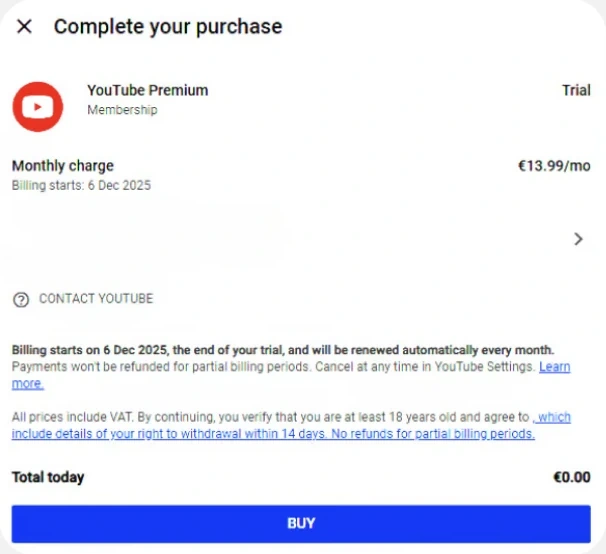
For a free trial month, also keep the plan price on the card. YouTube may check the card with a hold for that amount, it is not a charge.
Billing address for the form
Ready-made addresses in the US and Estonia are in the app, in the article “Which name and address to enter”.
YouTube Premium rules
Card and prices
Common questions
My Google profile has a different country
The country of a Google payments profile cannot be changed. Create a new one on payments.google.com, in Settings next to Country tap Edit, then Create new profile. Each country allows only one profile.
YouTube says We couldn’t verify your country
Connect to another network or sign up for Premium in the YouTube app on your phone, through your profile picture. On Android the payment goes through Google Play.