Paying through Stripe
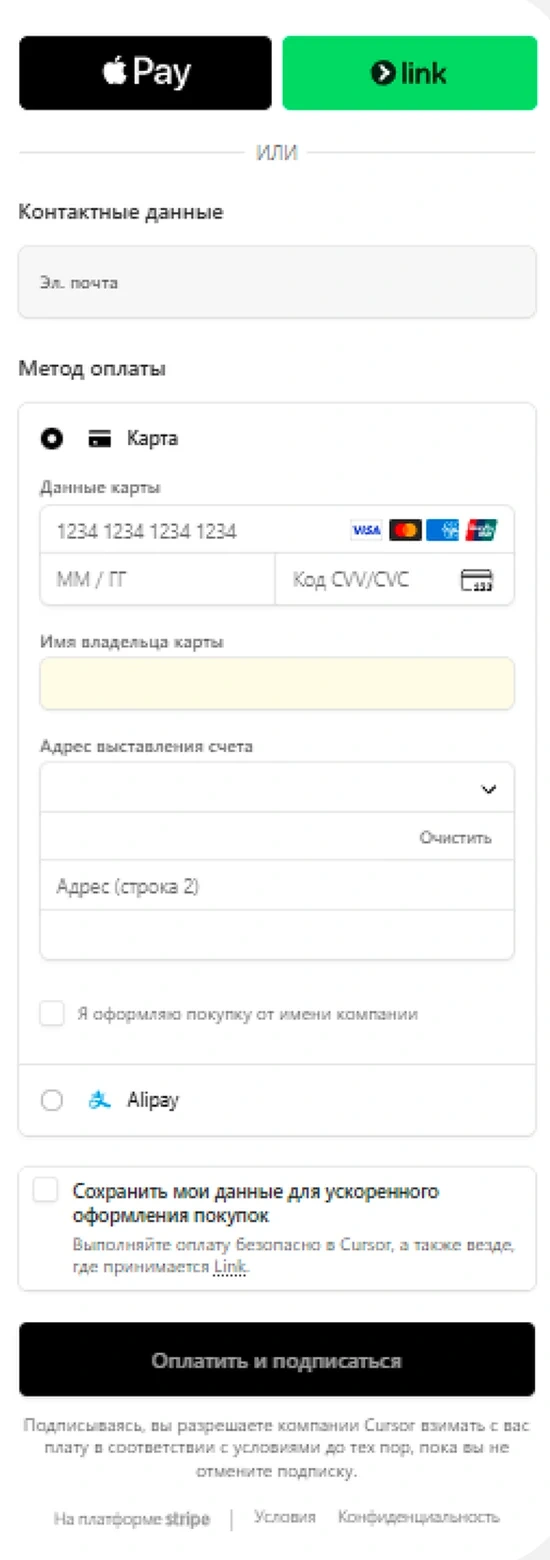
The Stripe form is used to pay in Claude, ChatGPT, Cursor and many other services. Here is how to fill it in.
What you need
-
Enter the number, expiry and CVC
Copy them in “Details”. CVC in the form is the CVV.
-
Enter the name in Latin letters
Any name in Latin letters, your own is fine.
-
Enter the country and address
Country United States, a state with no sales tax. A ready-made address and a backup Estonia one are in this article in the app.
-
Skip Link
This is the Stripe wallet, you do not need it to pay.
-
Tap the pay button
If the bank asks for a code, it arrives in the chat with the bot. If it asks where to send it, choose email.
Billing address for the form
Ready-made addresses in the US and Estonia are in this article in the app.
Card and prices
CardVisa Business from the EU, in US dollars
Card typeDebit, not prepaid
Card issue$10 once, no documents
Wallet top-upWith crypto, no fee
Transfer to the card7.5% of the amount
Card payment$0.25 per transaction
Price not in dollars2.5% conversion
Monthly feeNone
3D Secure codesArrive in Telegram