How to add a virtual card to Apple Pay
The Only Wallet virtual Visa card is added to Wallet on iPhone with its card details, and the confirmation code arrives in the bot chat in Telegram. It is a European business Visa card in US dollars: $10 to issue, once, free crypto top‑ups, 7.5% to move money to the card and $0.25 per payment. Then pay with your phone wherever contactless payments are accepted.
What you need
- An Only Wallet card
- An iPhone with Wallet
-
Open the card details
On the “Cards” tab tap “Details”. You will need the number, expiry and CVV in Wallet.
-
Tap “Add Card”
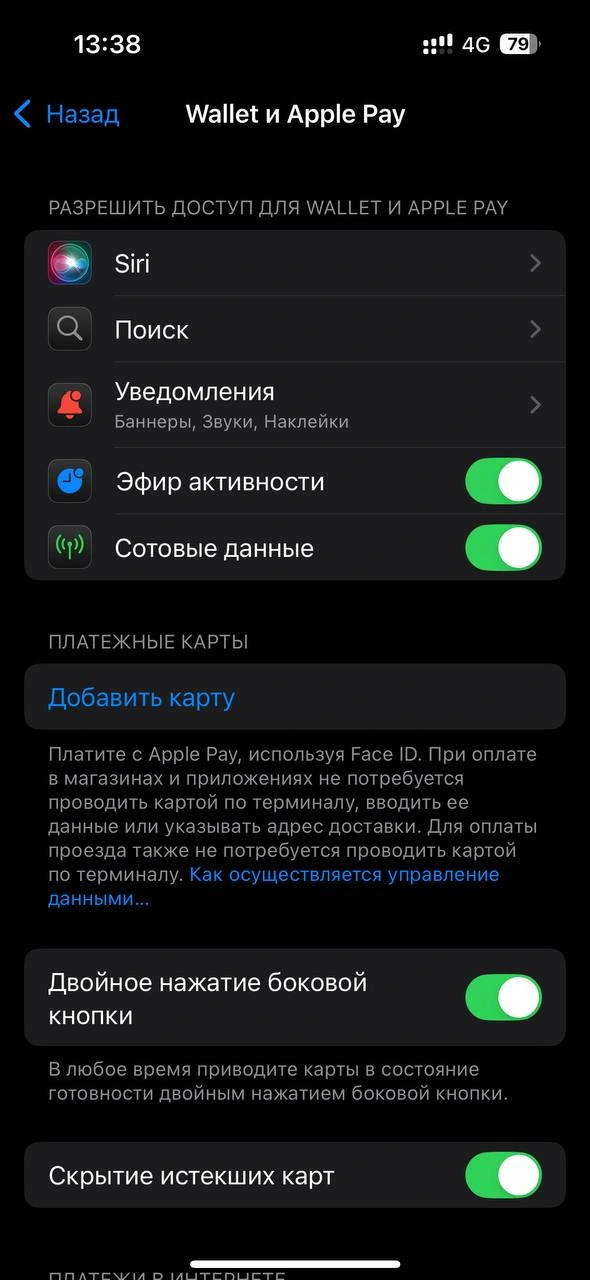
In iPhone “Settings” open “Wallet & Apple Pay” and tap “Add Card”. Choose “Debit Card” and “Enter Card Details Manually”.
-
Enter the card details
Copy the number, expiry and CVV from the app one field at a time, and type the name in Latin letters.

-
Confirm the card with a code
Choose “Text Message” verification and tap “Send Code”. The number in Wallet is not yours, it is the Only Wallet number for codes. The code arrives in your chat with the bot in about half a minute, enter it in Wallet.
-
Done
Once the card is added, the bot will write “Card •• 1234 has been added to Apple Pay”. If the card is removed from Wallet, the bot will tell you too.
If Wallet only offers a call, call the number on the screen and the card will be confirmed by phone. Or add the card again in a day, then verification by code often appears.
Card and prices
Common questions
Does it work in Russia
No, Apple Pay is not available in Russia.
Wallet says Card Not Added
This is an Apple limit for your iPhone. You can’t add the same card more than 3 times in 3 days or more than 5 different cards to one phone in a day. Wait a day or add the card from another iPhone.